SMS Opt-In Consent Process
How end users consent to receive text messages from Fluid Dynamics LLC via the webchat widget on fluid-dynamics.biz.
Last updated: August 23, 2026
How opt-in works
1
A visitor to fluid-dynamics.biz clicks the chat icon in the bottom-right corner of the page to open the webchat widget.
2
The widget displays fields for name, phone number, email, and a message, along with an unchecked consent checkbox and required disclosure language positioned directly above the Submit button.
3
The visitor may submit the inquiry without consenting to SMS.
Screenshot: SMS Consent Widget
The webchat widget as it appears by default, with the SMS consent checkbox unchecked.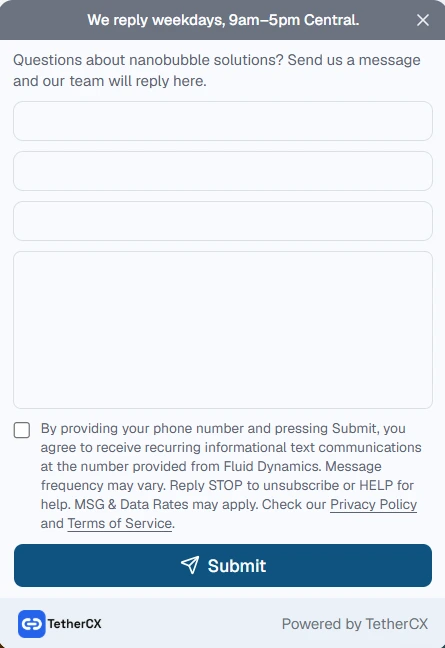
Exact consent language shown to the user
"By providing your phone number and pressing Submit, you agree to receive recurring informational text communications at the number provided from Fluid Dynamics. Message frequency may vary. Reply STOP to unsubscribe or HELP for help. MSG & Data Rates may apply. Check our Privacy Policy and Terms of Service."
Note: The checkbox is unchecked by default. The form may be submitted without opting in for SMS.
Related policies
Privacy Policy: fluid-dynamics.biz/privacy-policy
SMS Terms & Conditions: fluid-dynamics.biz/terms